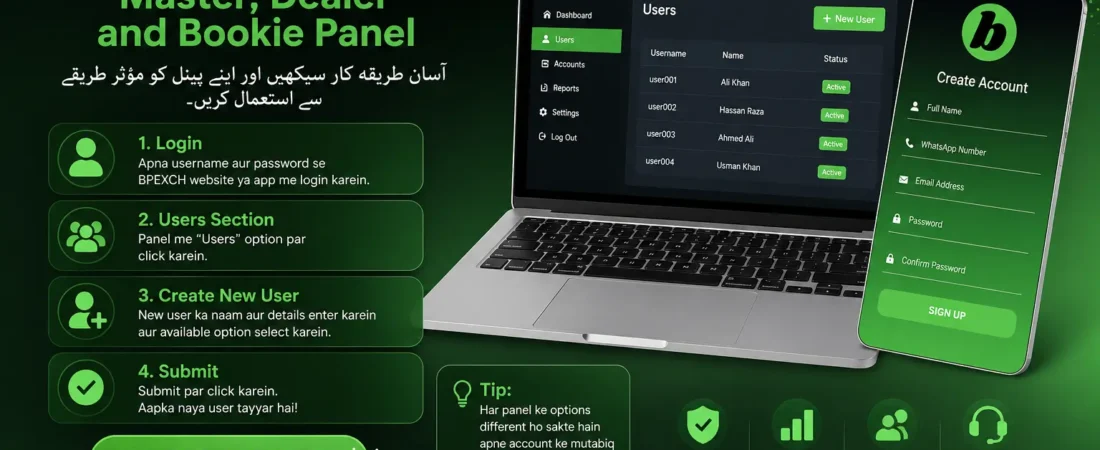
Many people contact us because they want to understand how a BPEXCH Master, Dealer, or Bookie panel works. A common question we receive is whether they can first get a panel or demo account to learn how to use it.
The reality is that these panels can be difficult to understand for someone using them for the first time. Just having access to a panel is not enough. If you don’t know where the options are or what each section does, managing the account can become confusing.
For this reason, it is better to learn the basic functions step by step.
After receiving your account login details, you can sign in to the BPEXCH platform using your username and password. Once you enter the panel, you will find different sections depending on the type of account you have.
One of the first things you need to understand is how to create a user.
Go to the Users section in your panel. Here, you can find the option to add or create a new user. Enter the required information and select the available user option shown in your account.
The options may not be the same for every panel. A higher-level panel may have additional choices, while a Dealer or Bookie account may provide fewer options. So, you should always use the options available in your own panel.
After completing the required details, click Submit. Your new user will then be created.
This is one of the basic steps involved in managing a BPEXCH panel. Once you understand how users are created, it becomes easier to learn the other functions of the system.
In the next blog, we will explain another important part of panel management: how payments are handled. We will continue sharing each process separately so you can understand the complete system without confusion.
ماسٹر، ڈیلر اور بکی پینل کیسے استعمال کریں؟
اس بلاگ میں ہم آسان طریقے سے سمجھائیں گے کہ BPEXCH کا ماسٹر، ڈیلر اور بکی پینل کیسے استعمال کیا جاتا ہے۔
ہمیں اکثر لوگوں کے پیغامات آتے ہیں کہ وہ ماسٹر، ڈیلر یا بکی پینل حاصل کرنا چاہتے ہیں۔ بہت سے لوگ پہلے اس کا ڈیمو دیکھنا چاہتے ہیں تاکہ انہیں معلوم ہو سکے کہ پینل کے اندر کام کیسے ہوتا ہے۔
لیکن جس شخص نے پہلے کبھی ایسا پینل استعمال نہ کیا ہو، اس کے لیے شروع میں اسے سمجھنا تھوڑا مشکل ہو سکتا ہے۔ صرف پینل حاصل کر لینا کافی نہیں ہوتا، بلکہ یہ جاننا بھی ضروری ہے کہ اس کے مختلف آپشنز کہاں ہیں اور انہیں کیسے استعمال کرنا ہے۔
اسی لیے پریشان ہونے کی ضرورت نہیں۔ ہم آپ کو آہستہ آہستہ ہر چیز آسان طریقے سے سمجھائیں گے۔
سب سے پہلے لاگ اِن کریں
سب سے پہلے آپ کو اپنے اکاؤنٹ کا یوزر نیم اور پاس ورڈ دیا جائے گا۔ یہ آپ کے ماسٹر، ڈیلر یا بکی اکاؤنٹ کے مطابق ہوگا۔
اپنی لاگ اِن معلومات کے ذریعے BPEXCH کی ویب سائٹ یا ایپ میں سائن اِن کریں۔ لاگ اِن ہونے کے بعد آپ کے سامنے اپنے پینل کی سکرین آ جائے گی۔
نیا یوزر کیسے بنائیں؟
پینل کھلنے کے بعد Users والے حصے میں جائیں۔ یہاں سے آپ نیا یوزر بنانے کا عمل شروع کر سکتے ہیں۔
نئے یوزر کے لیے مطلوبہ نام درج کریں اور اپنے پینل میں موجود مناسب آپشن منتخب کریں۔
یاد رکھیں کہ ہر پینل میں ایک جیسے آپشنز نہیں ہوتے۔ مثال کے طور پر، سپر ماسٹر پینل میں زیادہ آپشنز ہو سکتے ہیں، جبکہ ڈیلر یا بکی پینل میں آپ کو محدود آپشنز نظر آئیں گے۔
اپنے پینل کے مطابق درست آپشن منتخب کرنے کے بعد نیچے موجود Submit کے بٹن پر کلک کریں۔
بس، آپ کا نیا یوزر تیار ہو جائے گا۔
آج کے بلاگ میں ہم نے آپ کو نیا یوزر بنانے کا بنیادی طریقہ سمجھایا ہے۔ اگلے بلاگ میں ہم پیمنٹ سے متعلق طریقہ کار کے بارے میں بات کریں گے۔
ہم اسی طرح ایک ایک مرحلہ آسان الفاظ میں سمجھاتے جائیں گے تاکہ نئے لوگوں کو بھی پینل استعمال کرنے میں مشکل نہ ہو۔
Frequently Asked Questions
First, log in with your account details and check the options available in your panel. You can then learn each feature step by step.
Yes. It may look confusing at first, but once you understand the basic options, it becomes much easier to use.
Go to the Users section, enter the required details, and click Submit to create the user.
The options depend on your account type and access level, so every Master, Dealer, or Bookie panel may not look the same.
You need the username and password provided for your Master, Dealer, or Bookie account.
Yes, different account levels can have different features and options available.
Start by understanding the main sections of the panel and learn how to create and manage users.
Yes. It is easier to learn one feature at a time instead of trying to understand everything at once.